
Knowing whether or not you can trust a candidate’s track record and platform promises is tricky.
In municipal elections, it’s even more challenging when candidates are not affiliated with any particular political party. In Canada, mayors, city councillors and school board trustees don’t represent a political party, meaning that, at least in theory, they’re non-partisan.
This can make it tougher to figure out which candidate best represents you and your community’s needs and interests.
BECOME A GREEN LINE MEMBER TODAY
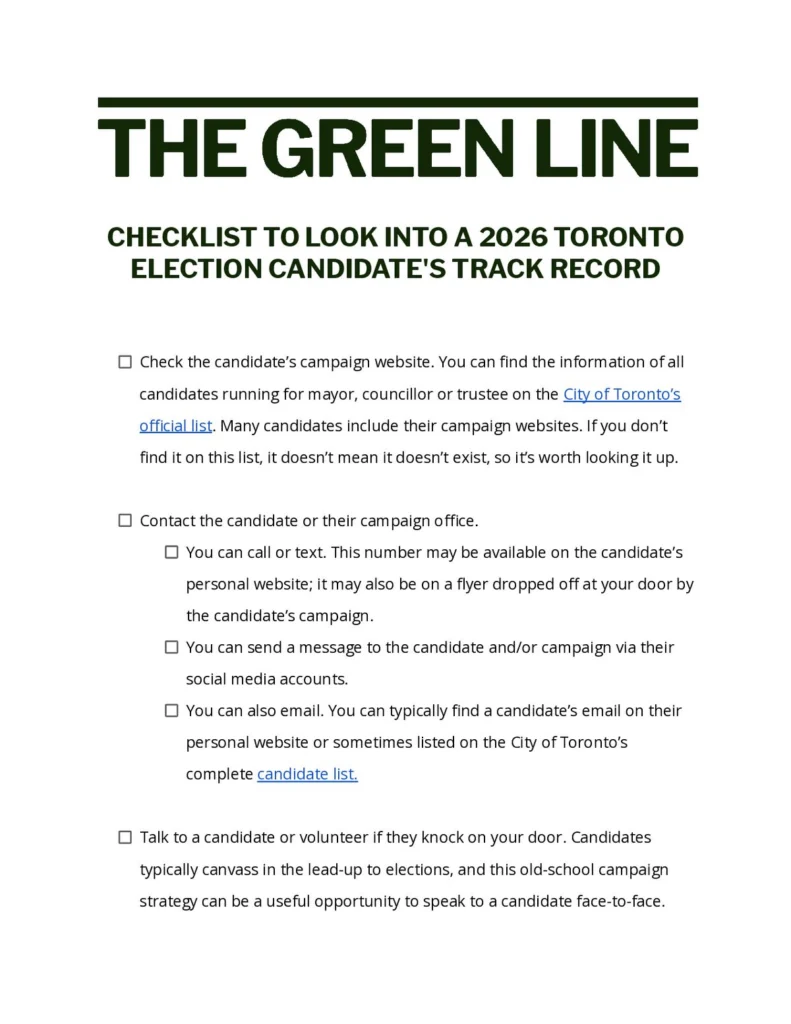
So, before casting your ballot in Toronto’s municipal election this October, use this checklist to help you learn more about your candidates — and help you decide whether or not you agree with their platform, align with their values and trust that they’ll deliver on their promises.
If you want to download or skim through our checklist, you’ll find a PDF of our tips at the end.
How to vet a candidate
Check the candidate’s campaign website. You can find the information of all candidates running for mayor, councillor or trustee on the City of Toronto’s official list. Many candidates include their campaign websites. If you don’t find it on this list, it doesn’t mean it doesn’t exist, so it’s worth looking it up.
Contact the candidate or their campaign office.
- You can call or text. This number may be available on the candidate’s personal website; it may also be on a flyer dropped off at your door by the candidate’s campaign.
- You can send a message to the candidate and/or campaign via their social media accounts.
- You can also email. You can typically find a candidate’s email on their personal website or sometimes listed on the City of Toronto’s complete candidate list.
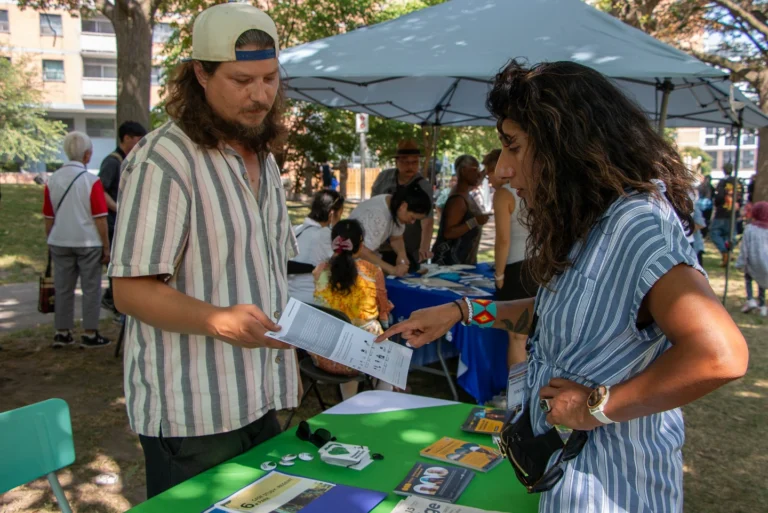
Talk to a candidate or volunteer if they knock on your door. Candidates typically canvass in the lead-up to elections, and this old-school campaign strategy can be a useful opportunity to speak to a candidate face-to-face.
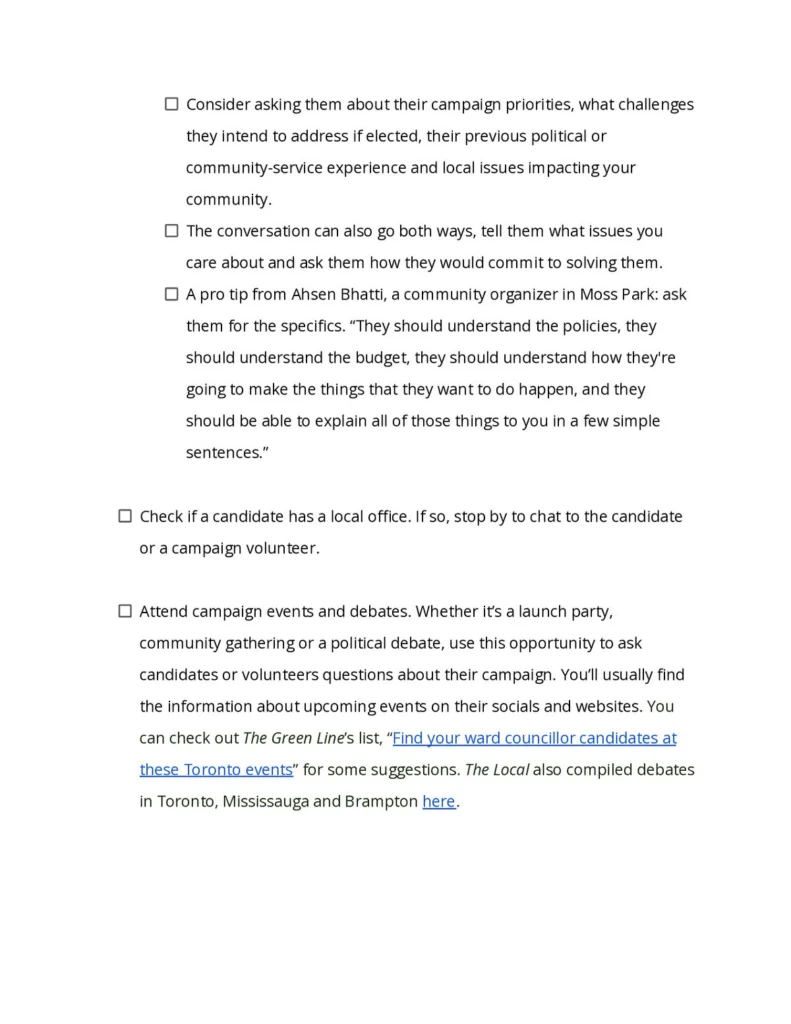
- Consider asking them about their campaign priorities, what challenges they intend to address if elected, their previous political or community-service experience and local issues impacting your community.
- The conversation can also go both ways, tell them what issues you care about and ask them how they would commit to solving them.
- A pro tip from Ahsen Bhatti, a community organizer in Moss Park: ask them for the specifics. “They should understand the policies, they should understand the budget, they should understand how they’re going to make the things that they want to do happen, and they should be able to explain all of those things to you in a few simple sentences.”
Check if a candidate has a local office. If so, stop by to chat to the candidate or a campaign volunteer.
Attend campaign events or debates. Whether it’s a launch party, community gathering or a political debate, use this opportunity to ask candidates or volunteers questions about their campaign. You’ll usually find the information about upcoming events on their socials and websites. You can check out The Green Line’s list, “Find your ward councillor candidates at these Toronto events” for some suggestions. The Local also compiled debates in Toronto, Mississauga and Brampton here.
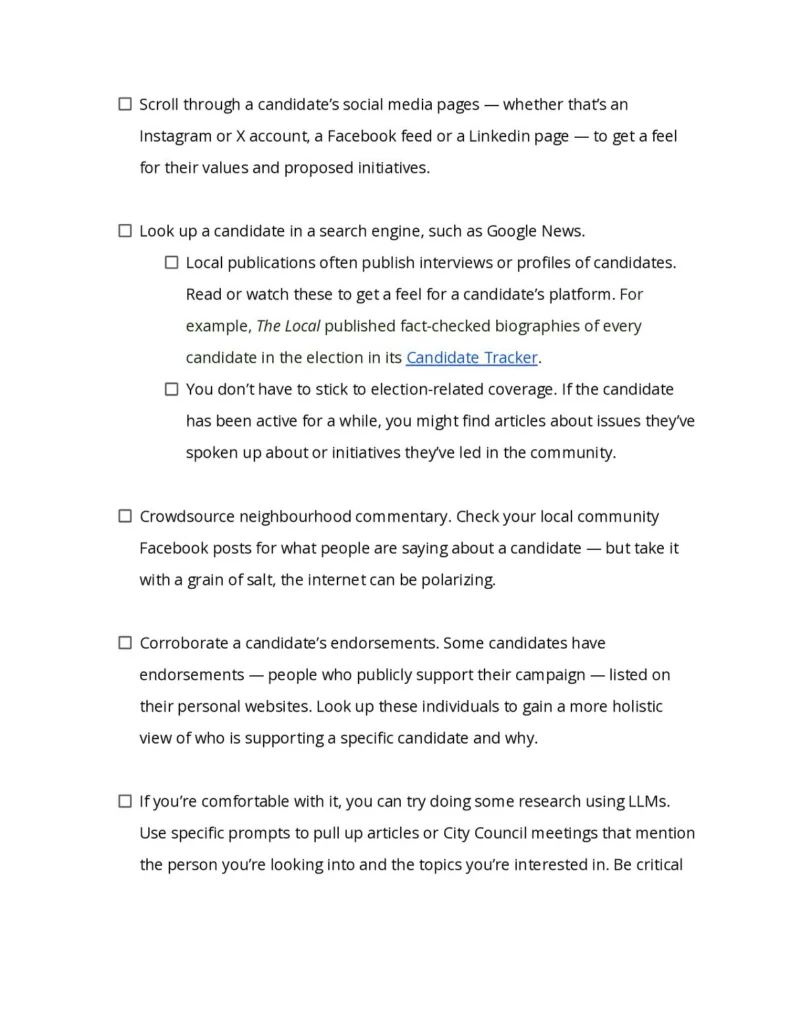
Scroll through a candidate’s social media pages — whether that’s an Instagram or X account, a Facebook feed or a LinkedIn page — to get a feel for their values and proposed initiatives.
Look up a candidate in a search engine, such as Google News.
- Local publications often publish interviews or profiles of candidates. Read or watch these to get a feel for a candidate’s platform. For example, The Local published fact-checked biographies of every candidate in the election in its Candidate Tracker.
- You don’t have to stick to election-related coverage. If the candidate has been active for a while, you might find articles about issues they’ve spoken up about or initiatives they’ve led in the community.
Crowdsource neighbourhood commentary. Check your local community Facebook posts for what people are saying about a candidate — but take it with a grain of salt, the internet can be polarizing.
Corroborate a candidate’s endorsements. Some candidates have endorsements — people who publicly support their campaign — listed on their personal websites. Look up these individuals to gain a more holistic view of who is supporting a specific candidate and why.
If you’re comfortable with it, you can try doing some research using LLMs. Use specific prompts to pull up articles or City Council meetings that mention the person you’re looking into and the topics you’re interested in. Be critical of the results and double check them yourself: check that the references are real and skim through them to confirm the stance the candidate took.
Look for non-partisan pledges that align with your values and check if a candidate has signed them. We’ve compiled some examples below.
- Review the Community-led Planning Pledge to see which municipal candidates are committed to funding community-led planning and centering community voices in Toronto.
- Check out the TTCriders Transit Pledge to see which candidates are committed to making the TTC more affordable, reliable and accessible.
- If you’re a cyclist or care about safe infrastructure for cyclists in the city, you can sign Cycle Toronto’s Municipal Election Pledge, which means you commit to vote for candidates who will make Toronto more bike-friendly. Once you sign it, the organization will keep you up to date on where candidates stand before election day.
- Check out Elect Respect, a pledge to build a political culture free from harassment, abuse, personal attacks, threats or intimidation. While this pledge isn’t Toronto-specific (it applies to all Canadian elected officials, candidates and members of the public), you can click on the tab “Signatories” to see which candidates for Toronto’s municipal election have signed it.
- The Toronto Environmental Alliance also shared which candidates have signed its pledge to vote to implement a maximum temperature bylaw and a strategy to reduce single-use trash, add funding to plant trees in hot neighbourhoods, pause the approval of large AI datacentres until there’s a city-wide regulatory framework and more. You can see who signed this pledge here.
Review candidates’ answers to surveys. With election season in full swing, many media publications, local organizations and advocacy groups are posting how candidates have responded to their questions and requests. The Green Line reached out to mayoral candidates with questions crowdsourced from readers — it’ll be posted on Oct. 13, so keep an eye out to check out the answers. In the meantime, we’ve also compiled survey results by advocacy and local groups:
- Toronto Environmental Alliance asked mayoral candidates Chris Alexander, Brad Bradford and Olivia Chow where they stand on key environmental issues. You can see the responses here.
- TTC riders sent out an 18-question survey to all candidates for mayor and councillor to ask them about their commitments to improving service, accessibility, affordability and safety. The results are here.
- Clean Indoor Air Toronto posted candidates’ response to a survey about this issue here.
- The Toronto Alliance for the Performing Arts conducted “ArtsVote,” a survey that asks candidates about their commitment to support art policy. Results are posted here.
- A volunteer group under the name “The Wards Project” shared interview answers with candidates in multiple areas of Toronto. You can read them here.
How to check an incumbent’s records
Check to see if a candidate has previously run in the municipal election or held office.
If they have, comb through their personal website to see what they have achieved in their past term(s). Most councillor websites have a page dedicated to local projects and/or news updates related to their work in the ward.
You can also check what their campaign previously promised to see if they have been consistent in their messaging.
Check how a candidate voted in past Toronto City Council meetings with the City of Toronto’s vote record dataset. You can download the 2022-2026 voting record for members of City Council as a CSV file to see a detailed breakdown of the motions they voted on and when.
If you want the information summarized for you, check out the City Hall Watcher newsletter on Substack. Written by Matt Elliot, a Toronto-based professor of journalism and journalist who writes for publications like the Toronto Star and CBC, this weekly newsletter breaks down what’s happening in Toronto’s City Council. It provides a complete voting record of each current Council member and analyzes things like the Council’s agenda and budget. It’s paid, but you can access it with a free seven-day trial. Students who meet specific criteria are eligible for a free subscription.
Take a look at City Hall Watcher Live, a companion tool to the City Hall Watcher newsletter. If you want to really dig into the voting habits of current Toronto City Council members, scroll through this website for live coverage of Council meetings. You can also find archived coverage of nearly 15 years of Council meetings.
Check out WardWatch, a digital, non-partisan informational site that provides a profile of each candidate, as well as a record of previous councillors’ voting history. Largely powered by AI, the site was made by PoliAlerts, a Canadian political intelligence software company founded by Ray Ahmed, who’s worked as a policy advisor with the Ontario Minister of Finance and the Minister of Labour between 2011 and 2015. The Green Line tested the database at random and found it accurate.
Check out curated voting records collected by local groups that align with your values.
- For example, Cycle Toronto broke down how every active member of Toronto City Council voted on cycling policies between 2022 to 2026.
- ClimateFast collected voting records on climate policy, broken down by wards here.
Fact-Check Yourself
Sources and
further reading
Don’t take our word for it — check our sources for yourself.